How Do Delegates Manage the Organization's Data Storage?
Required Delegate Permission
You can perform this operation if and only if you are an Admin Delegate or an IT Delegate.
Check the Admin Guide's Introduction to learn more about Delegates and the Organization Manager.
Abstract
Introduction
This section explains how to edit or delete one of your existing Databases.
From the Organization Manager, click on the Databases tab in the left sidebar.
You will see a tile for each Database in your Organization showing its main information: Name, Database Type, and Storage Space.

Edit Database
On the tile of the Database you want to edit click on Manage Database.

Based on the Database Type the Manage Database page will differ slightly.
-
Common Database
The page shows the Database name and description on the left, and a pie chart of the storage space on the right. The chart breaks down the space into: free storage, space used by eLegere, and space used by Other.
Note
You can't edit the Common Database's info.

-
Appliance Database
Organization
Appliance Databases are only available for Professional Organizations.
Make sure to have the right Organization Type for your needs.
Check Deploy, License, and Organization Type to learn more about Organization Types.
The page shows all the Database's information and settings on the left. A pie chart of the storage space on the right.
You can edit each section by clicking on the icon next to the section name.

A dedicated window will open where you can update the entries.
You can edit the following information:
-
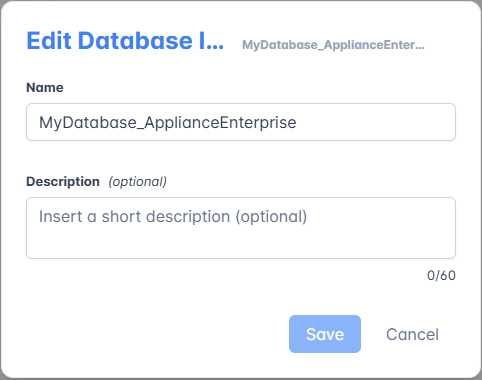
Name and Description of the Database.
-
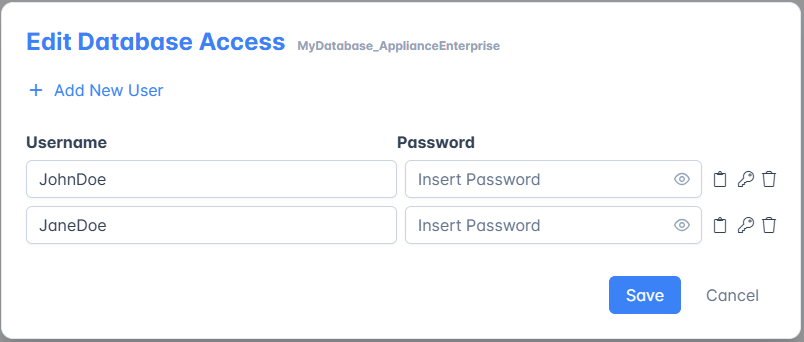
Users: edit or delete existing Users or add new ones.
-
Firewall Rules: edit or delete existing Firewall Rules or add new ones.

-
-
Private Database
You will see all the Database's information and settings on the left, and storage usage on the right. eLegere can't access a Private Database's info, so it can't display the total capacity chart .
You can edit the Database Info by clicking on the icon next to the section name.

A dedicated window will open where you can update the entries.

Success
You have edited a Database for your Organization!
Delete Database
Currently, it's impossible for Delegates to delete a Database directly from the Organization Manager.
If you need to delete an existing Database, contact your eLegere service provider directly. Your provider may vary based on your Deploy Type:
- For Shared Cloud or Dedicated Cloud contact Vesenda Srl.
- For Private Cloud contact your own infrastructure's team.
Your provider will assist you with Database deletion and data loss prevention.