Favorite Apps - Drag and drop your most used applications in a dedicated bar
Learn how to add your most used apps to the Favorite Apps sidebar.
You can see the Favorite Apps sidebar on the left side of your Workspace Home. Apps pinned here are always visible as you navigate through your Workspace's folders.

To add an app, drag and drop its tile into the Favorite Apps sidebar.

Click on an app's name to open it from anywhere in the Workspace.

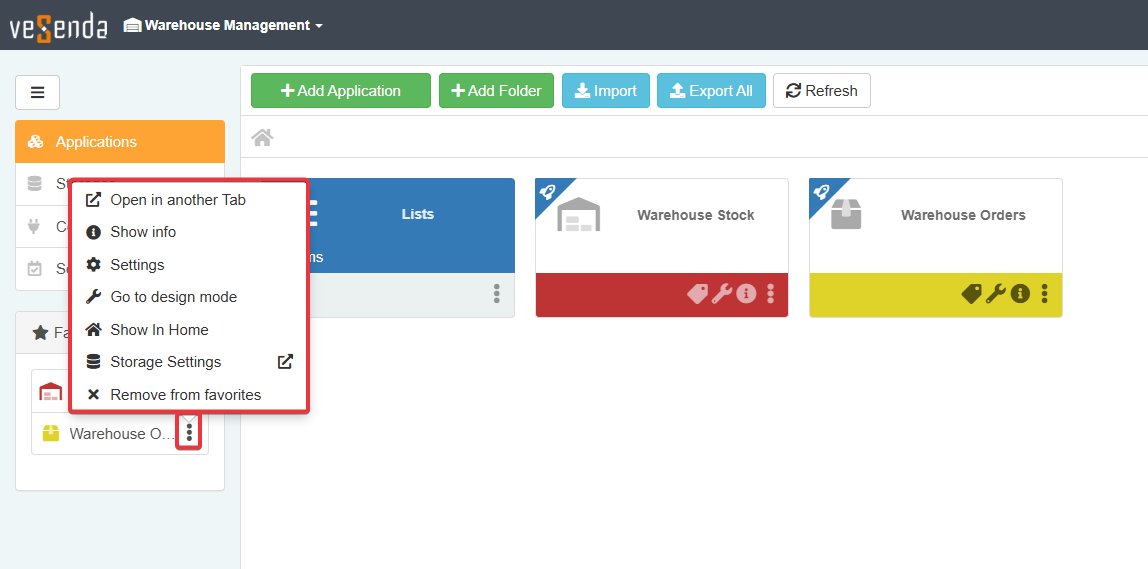
Click on the icon next to an app's name to open its menu with the options available.

From this menu, all Users can:
- Open in another Tab — open the app in a new browser tab.
- Show info — view the app's details.
- Show in Home — navigate to the app's location in the Workspace Home.
- Remove from Favorites — remove the app from the sidebar.
eLegere will display different options to users with different permissions. Designers and Workspace Admins also have access to:
- Settings — open the Application Settings.
- Go to Design Mode — open the application's Design Mode.
- Storage Settings — open the application's Storage Settings.
Success
You learned how to add an app to the Favorite Apps sidebar.