Use Case Example
Starting from a use case, this document shows common operations involving multiple eLegere Script functions and classes methods.
Abstract
The document provides a use case while commenting the most frequent eLegere Script operations.
Warning
You should not use eLegere Script in every case where multiple scripts modify the same rows. eLegere does not guarantee the execution order of the eLegere scripts.
The Case
The document takes the following case as an example to show the most common operations Users can perform with eLegere Script.
There are two Applications and two Storages that must interact with one each other. The applications manage the assignment of employees to customers' projects.
Application: Employees
The User registers the list of employees through the Employees application. Also, it assigns Roles and Projects to the row of the employee.
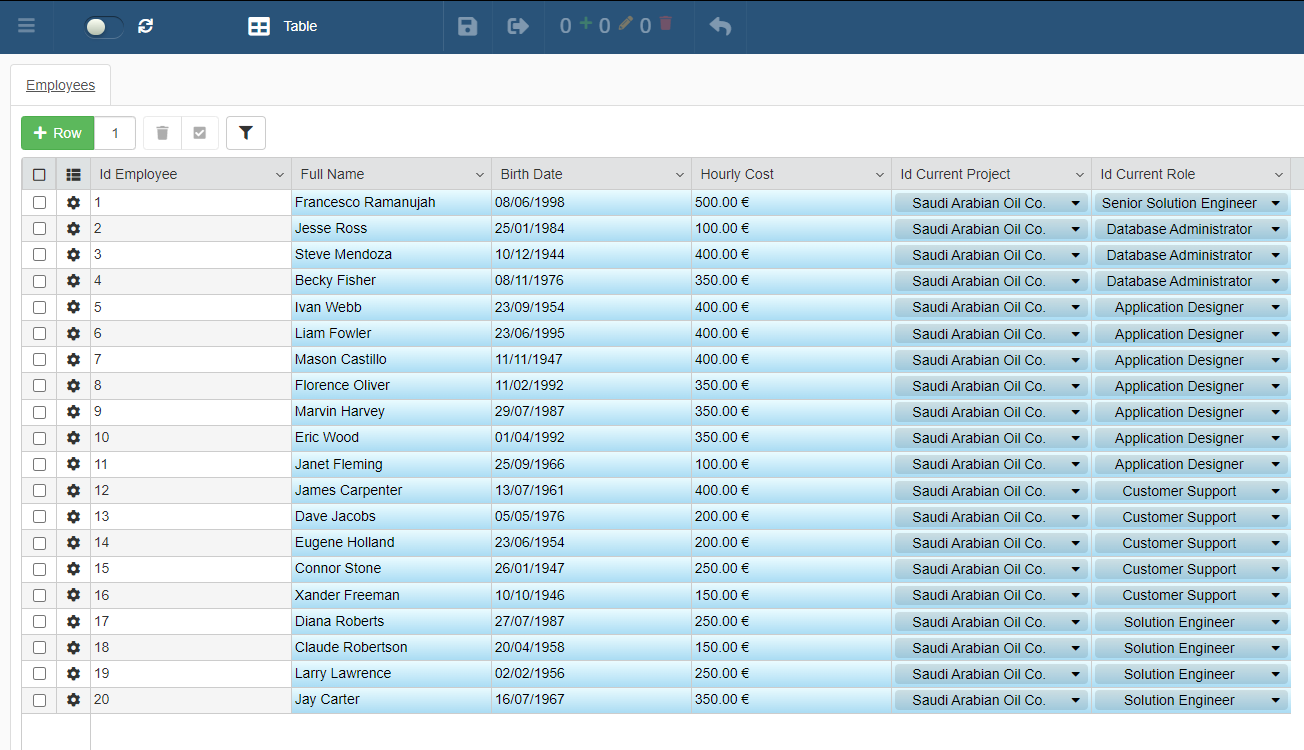
The Employees application manipulates data from the Storages Employees and Roles.
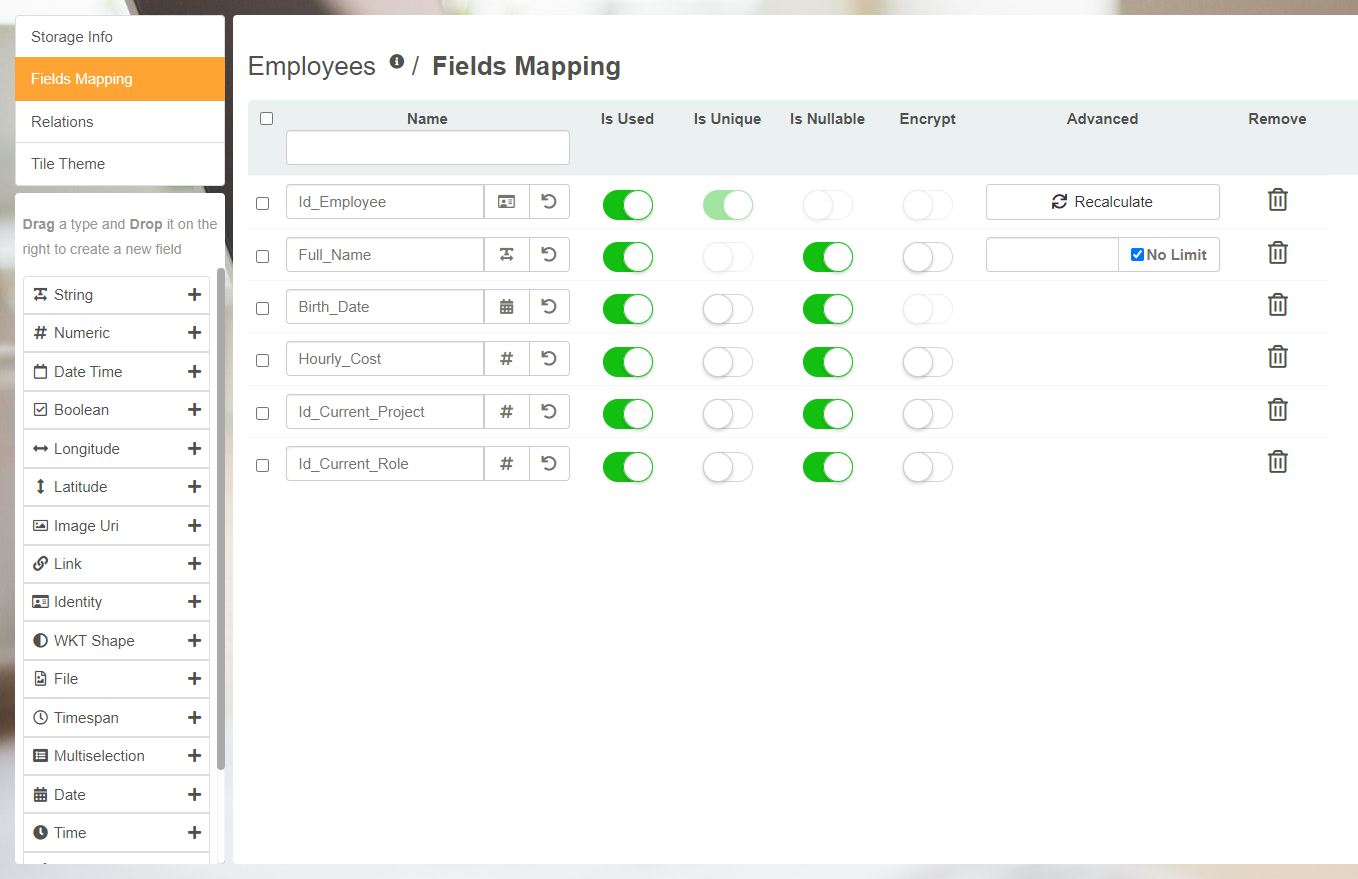
Employees Storage includes the following fields:
Id_EmployeeThe field identifying the row of each employee. It is an Identity type field.Full_NameThe name of the employee. It is a String type field.Birth_DateThe birth date of the employee. It is a Date type field.Hourly_CostThe hourly cost of the employee's services. It is a Numeric type fieldId_Current_ProjectThe field to build the Lookup relation with the Projects storage. It is a Numeric type fieldId_Current_RoleThe field to build the Lookup relation with the Projects storage. It is a Numeric type field.

Roles Storage includes the following fields:
Id_RoleThe field identifying the row of each Role. It is an Identity type field.Role_NameThe name of the employee. It is a String type field.
Application: Projects
The User tracks projects through the Projects application. Each row has a Detail table listing all the employees working on the project.
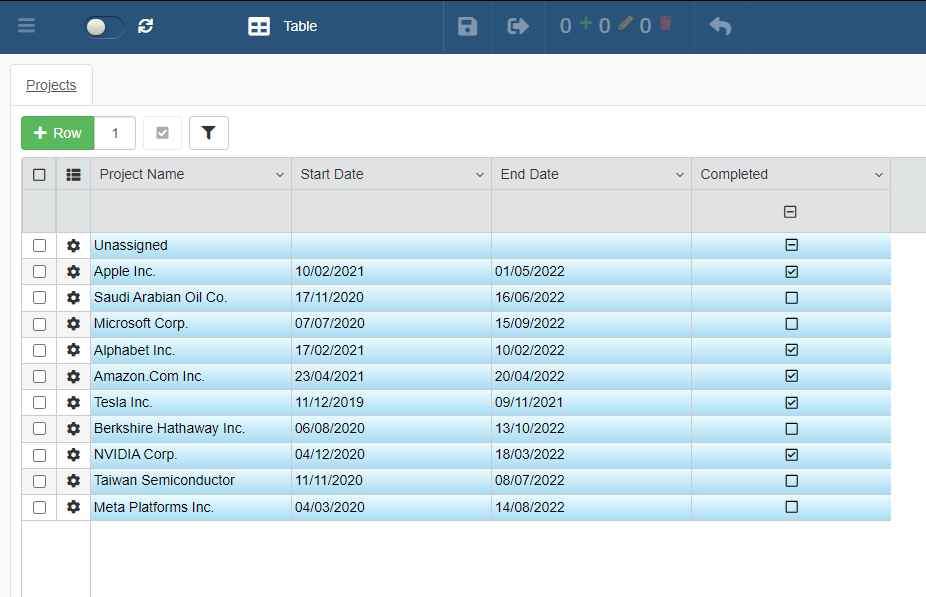
Projects registers the name of the project, beginning date, end date, and completition status.
Each row with the name of the project has a Detail table called Project Team.
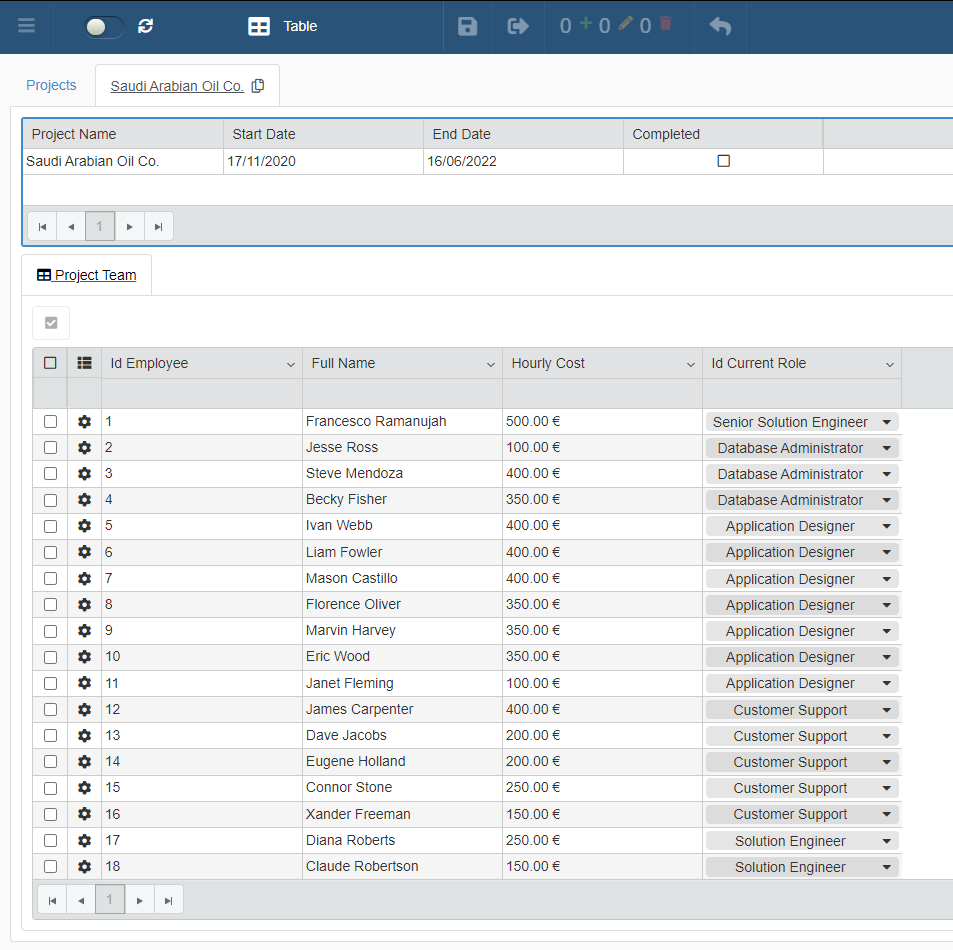
Project Team takes data from the Storages Employees and Roles. The Detail table summarizes the Employee's Id, the Full Name, the Hourly Cost, and the Current Role within the project.
Besides taking data Employees and Roles, Projects manipulates data from the Storage Projects
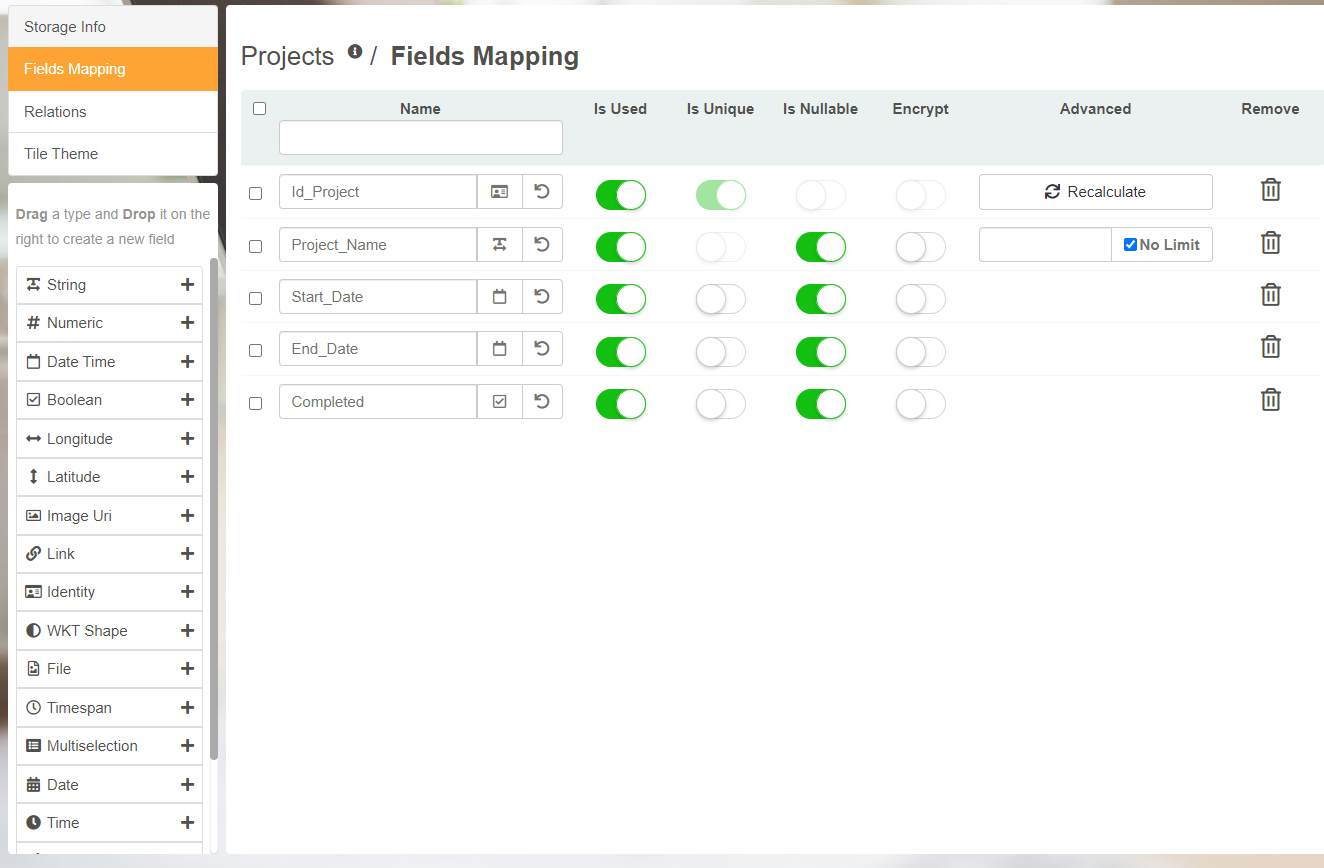
Projects Storage includes the following fields:
Id_ProjectThe field identifying the row of each project. It is an Identity type field.Project_NameThe name of the project. It is a String type field.Start_DateThe beginning date of the project. It is a Date type field.End_DateThe ending date of the project. It is a Date type field.CompletedThe status tracker of the project. It is a Boolean type field.
The Necessity
Actions on the Project application must create or modify rows on the Detail table or the row in Employees automatically.
eLegere Script makes this process possible. Below, the document takes and examines some eLegere Script actions working under the hood of Projects.
Updating Detail Rows after Master Row Update
The User inserts or updates the Master Row of an Application. The action must create or update one or more Detail Rows of an Application. In the example below, we create 3 new rows in the "Team Members" detail and link them to a newly created row on the Projects application.
1 2 3 4 5 6 7 8 9 10 11 12 13 14 15 16 17 18 19 20 21 22 23 24 25 26 27 | |
projectsApp refers to the Projects application. In order to create the object we need to pass to the elegere.getApplicationFromToken function:
context.ApplicationIdThe parameter identifies the Id of the Application in which the script writes the rows.context.DomainIdThe parameter identifies the Domain of the Application.context.UrlThe parameter identifies the Url of the eLegere environment.context.SessionTokenThe parameter takes the SessionToken of the User's login for authentication.
context is the object that contains information about the environment inside which the script is executed.
detailRowsToCreate is an object containing the information to register as detail rows of the Projects application.
saveResult is the result of the saveManyDetail method.
The saveManyDetail method takes the Detail table name "Team Members", the Id of the Master Row, and creates several detail rows.
Updating Master Rows of Application A and Application B
The User inserts or updates the Master Row of Application A. The action must creare or update one or more Master Rows in Application B. In the example below, once a project is set to "Complete", we update all the rows on the app "Employees" to show that they are now Unassigned.
1 2 3 4 5 6 7 8 9 10 11 12 13 | |
employeesApp refers to the Employees application. In order to create the object we need to pass to the elegere.getApplicationFromToken function:
employeesAppIdThe parameter identifies the Id of the Application in which the script writes the rows.context.DomainIdThe parameter identifies the Domain of the Application.context.UrlThe parameter identifies the Url of the eLegere environment.context.SessionTokenThe parameter takes the SessionToken of the User's login for authentication.
context is the object that contains information about the environment inside which the script is executed. context.NewItem is the completed project's row.
completedProjectId is the value of the Id_Project field for the row that was just updated.
projectFilter is the filter that selects the employees we want to update.
projectEmployees is the list of employees that are currently associated to the updated project.
updatedEmployees creates a representation of the Employee rows with the two required system fields, Id and TIMESTAMP, and the fields we want to modify (in this case only the Id_Current_Project field). We use the JavaScript .map method to transform every individual row.
The saveMany method finally updates the Employee rows that we want to dissociate from the project.
Deleting a Master Row and all the related Detail Rows
The User deletes a Master row in the application. The action must clear all the related Detail rows connected to that Master row. In the following example, we delete a row on the Project app, and then we delete all the Employee rows that are associated with that project.
1 2 3 4 5 6 | |
projectsApp refers to the Projects application. In order to create the object we need to pass to the elegere.getApplicationFromToken function:
context.ApplicationIdThe parameter identifies the Id of the Application in which the script writes the rows.context.DomainIdThe parameter identifies the Domain of the Application.context.UrlThe parameter identifies the Url of the eLegere environment.context.SessionTokenThe parameter takes the SessionToken of the User's login for authentication.
context is the object that contains information about the environment inside which the script is executed.
deletedProjectId is the value of the Id_Project field for the row that was just deleted. Notice how we take this value from context.OldField, as since the row was just deleted, context.NewItem will be null.
projectFilter is the filter that selects the employees we want to delete.
rowsToDelete is the list of the employees that we want to delete. We obtain this list of employees through the getDetails method.
The deleteManyDetail method finally deletes the Employee rows that we want to remove from the app.